Zema
Download free
ዜማ “melody” in Amharic · free for every church

Amharic worship slides the whole church can sing

Zema puts Amharic or Tigrinya lyrics, their pronunciation in Latin letters and an English or Dutch translation together on one slide. Paste a song and it writes the pronunciation for you.

Windows 10/11 and macOS 11 or newer · No account needed

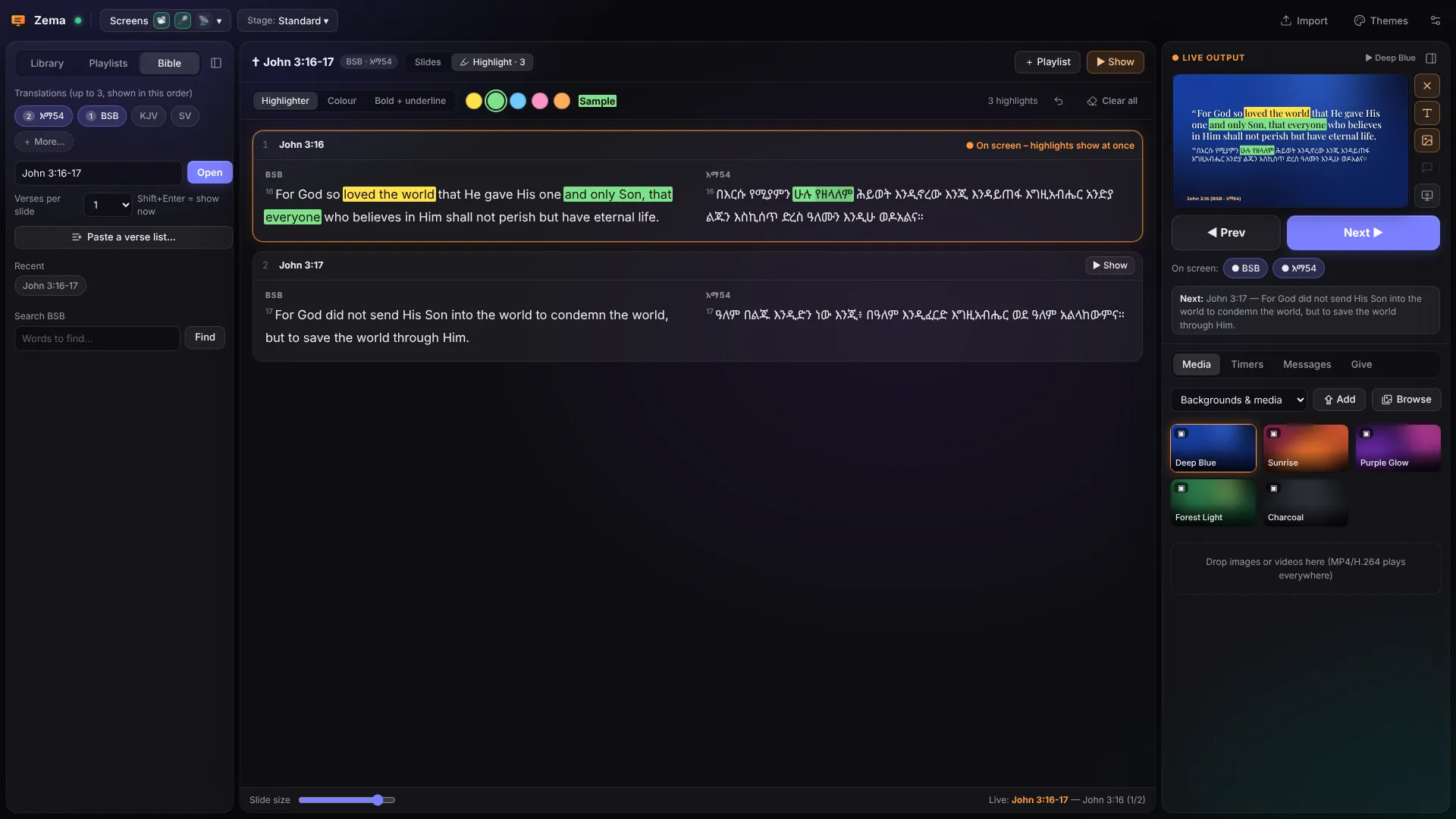
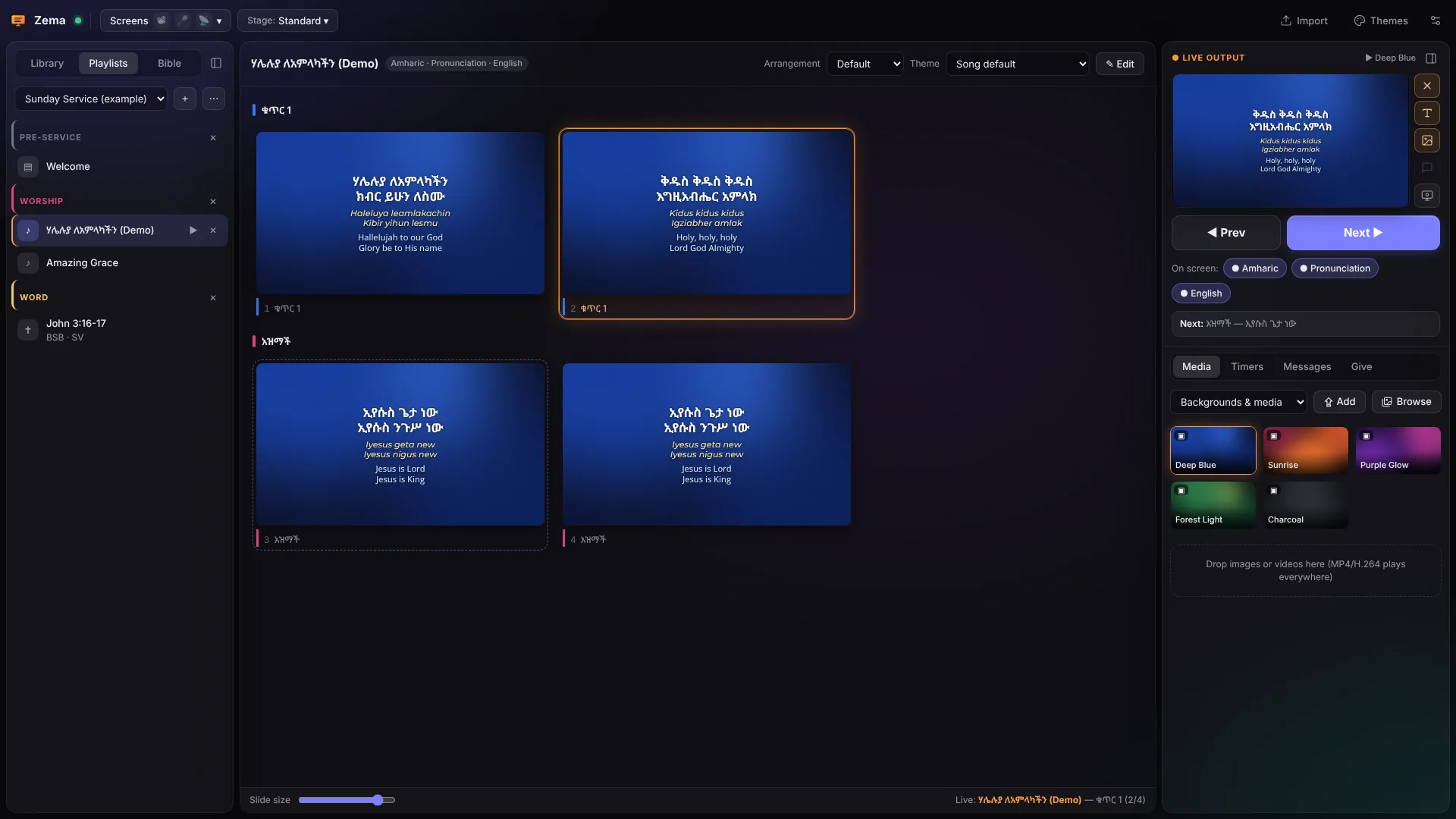
The Zema console: a service playlist on the left, the slides of an Amharic song with pronunciation and English in the middle, and the live output on the right.
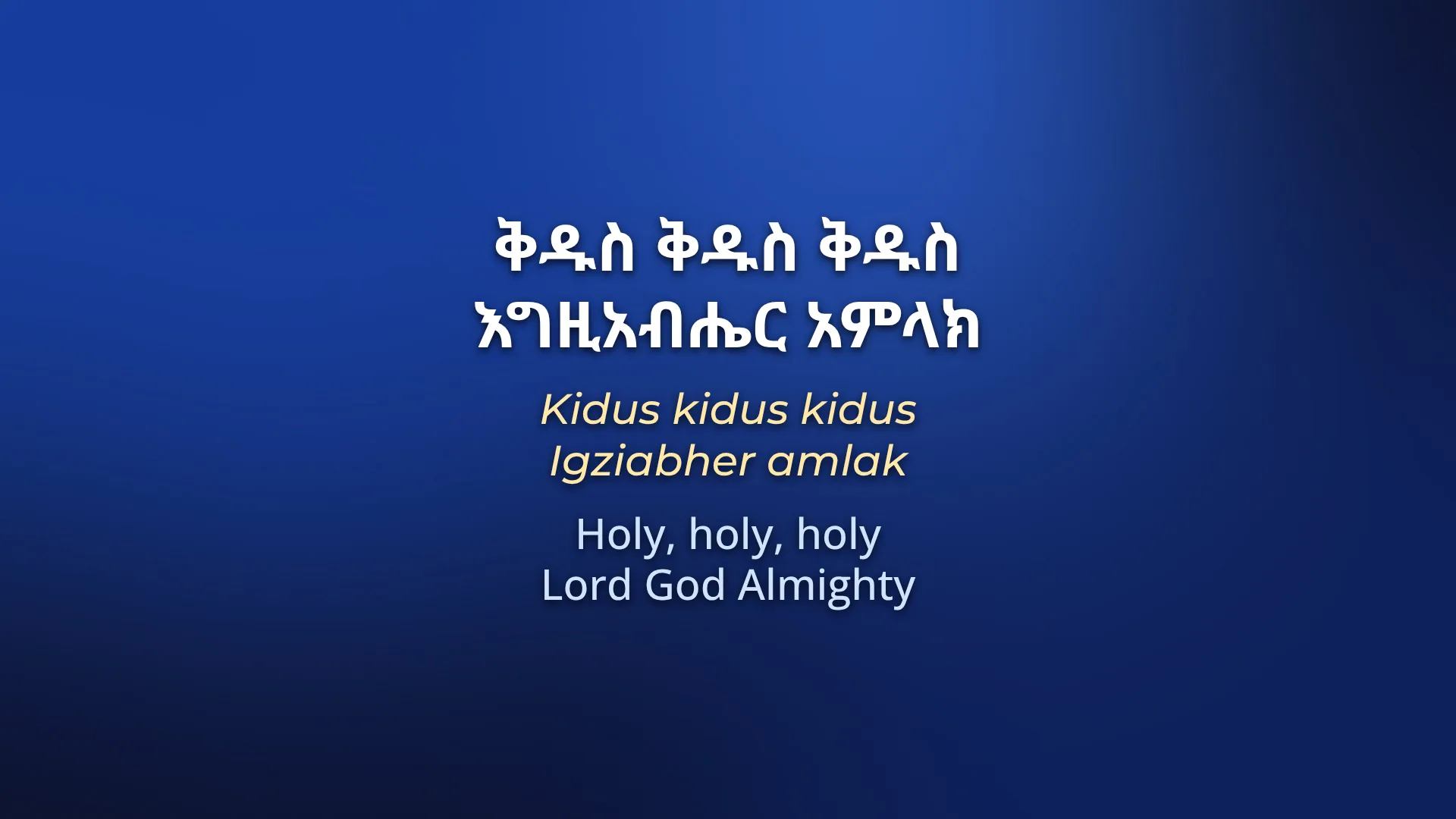
The projector shows the slide: Amharic, its pronunciation and English.
How it works

From a pasted song to three languages on the screen

If your team types the Amharic, the pronunciation and the English into PowerPoint every week, this is the work Zema takes over.

  1. Paste the song

    Copy the lyrics from a website, a PDF or a WhatsApp message and press Ctrl+V (⌘V on a Mac). Zema finds the አዝማች and the verses, tidies the lines and makes the slides.

  2. Add the other languages

    The pronunciation is written from the Ge'ez letters on your own computer, for free. For English or Dutch, Zema translates the song line by line with Claude, for about a cent a song. You read it through before Sunday and change any word you like.

  3. Click to present

    Click a slide and the projector, the band's monitor and the livestream change together. Standing at the sound desk? Use your phone as the remote.

ኢየሱስ ጌታ ነው

Iyesus geta new

Jesus is Lord

Amharic, as you pasted it Pronunciation, written by Zema English, translated line by line
Made for Ge'ez

Zema knows how Amharic and Tigrinya songs are written

The pronunciation rules, the Bible and the fonts for Ge'ez come with Zema. There is nothing to set up before your first service.

Pronunciation for everyone who can't read Fidel yet

Young people who grew up abroad often read Latin letters more easily than Fidel. Zema writes that line from the Ge'ez text, with separate rules for Amharic and Tigrinya, so ኢየሱስ ንጉሥ ነው becomes Iyesus nigus new without anyone typing it.

When the worship leader changes a line of the Amharic later, the pronunciation and the translation move with it. Only new or changed lines are translated again.

ሃሌሉያ ለአምላካችን
Haleluya leamlakachin
ቅዱስ ቅዱስ ቅዱስ
Kidus kidus kidus
እግዚአብሔር አምላክ
Igziabher amlak
Pronunciation and translation in the guide

Lyrics the way people share them

Paste a song with [አዝማች] or chorus markers, repeat marks such as x2 or 2 ጊዜ, and ፡ between the words. Zema keeps the song and drops the rest.

The Amharic Bible, with Amharic book names

Type ዮሐንስ 3:16, John 3:16 or Joh 3:16 and get the verse in up to three translations side by side.

Fidel that looks right on the projector

Noto Sans Ethiopic, Noto Serif Ethiopic and Abyssinica SIL are inside Zema, so the church computer needs no extra fonts.

አማርኛ Amharicትግርኛ TigrinyaEnglishNederlandsAfaan OromoFrench, German, Spanish and more
On Sunday

One window runs the songs, the Bible reading and the band's screen

Bible

Highlight the words the preacher points to

Open a passage in up to three translations and drag across words to highlight them. Do it while preparing, or live during the sermon: the screens follow at once, drawn in like a pen stroke.

  • Paste the verse list from the sermon notes and every passage lands in the playlist.
  • Book names work in English, Dutch and Amharic, short or long.
The Bible in Zema
John 3:16 in English and Amharic with words highlighted in yellow and green, while it is on screen.
Songs

Each language in its own column

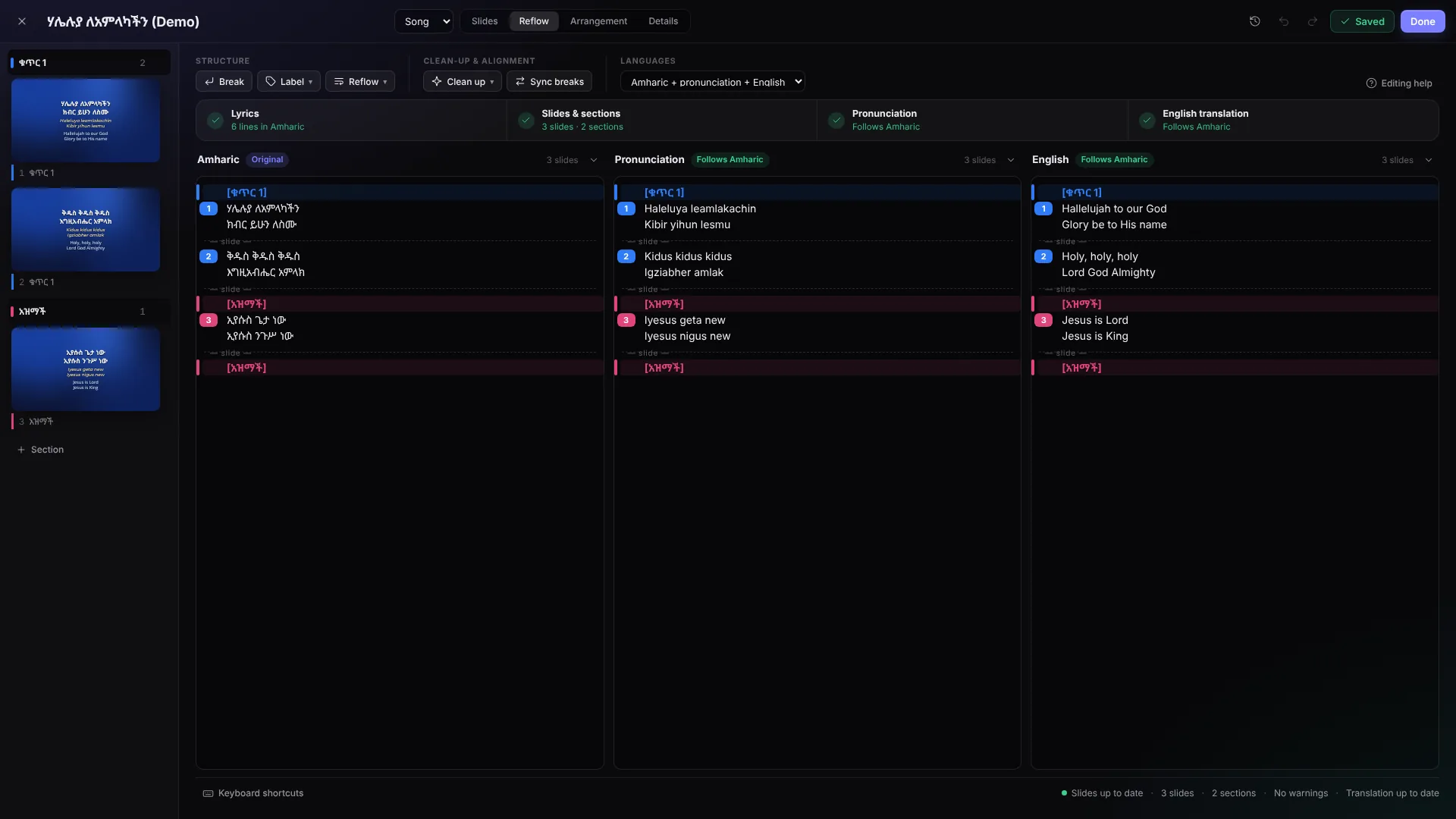
In the song editor every language is a column. A blank line starts a new slide and [አዝማች] starts a section. Arrangements keep the order you sing in, such as V1 C V2 C B C.

How songs work
The song editor with the Amharic lyrics, the pronunciation and the English translation in three columns.
On stage

The band sees the next slide before the church does

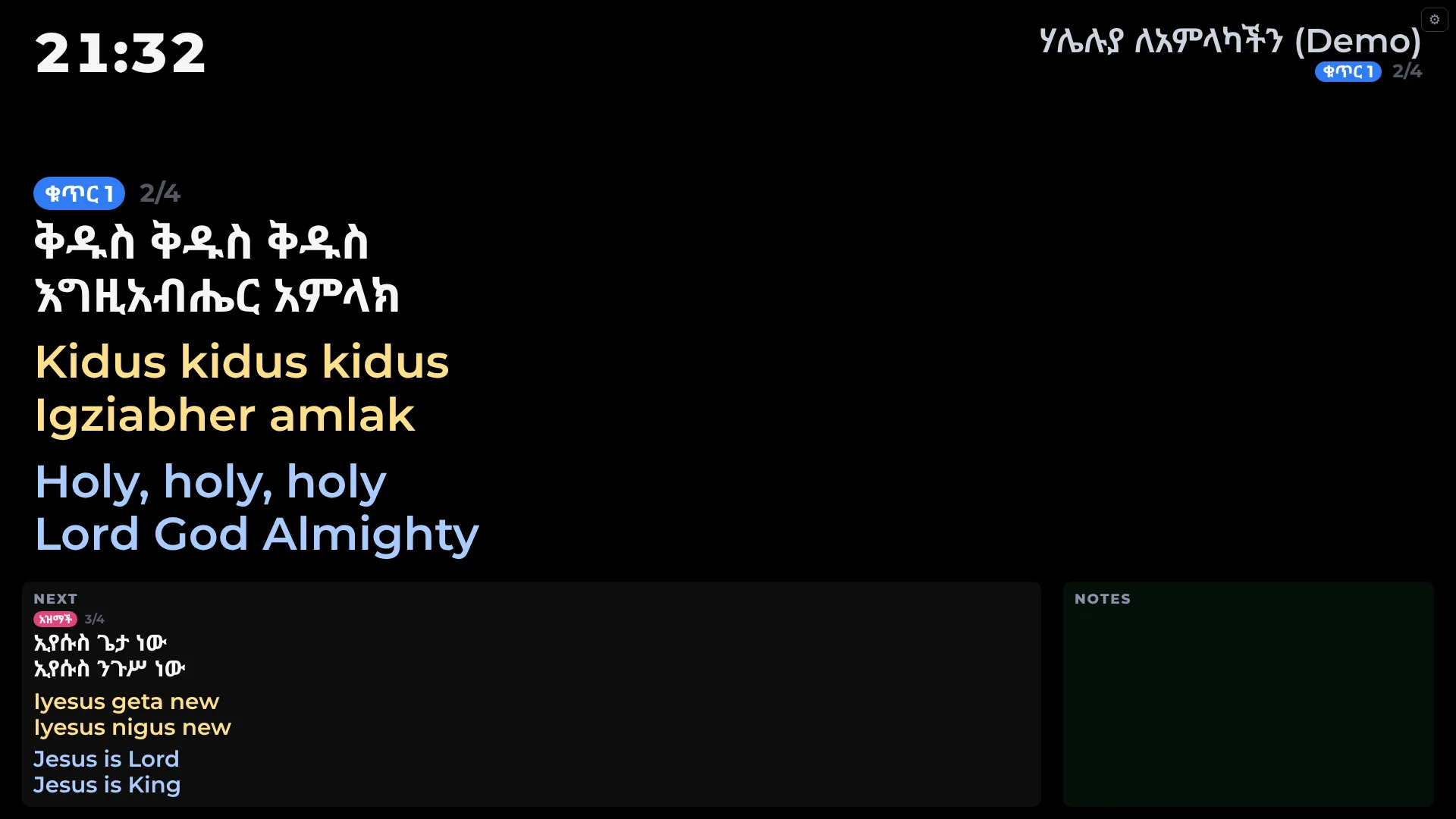
The stage display shows the current and the next slide, a clock, countdowns and messages that only the band and the speaker see. Pick one of four layouts or design your own.

Stage display
The stage display: the current slide large, the next slide and a clock.
Anywhere in the room

Run the slides from your phone

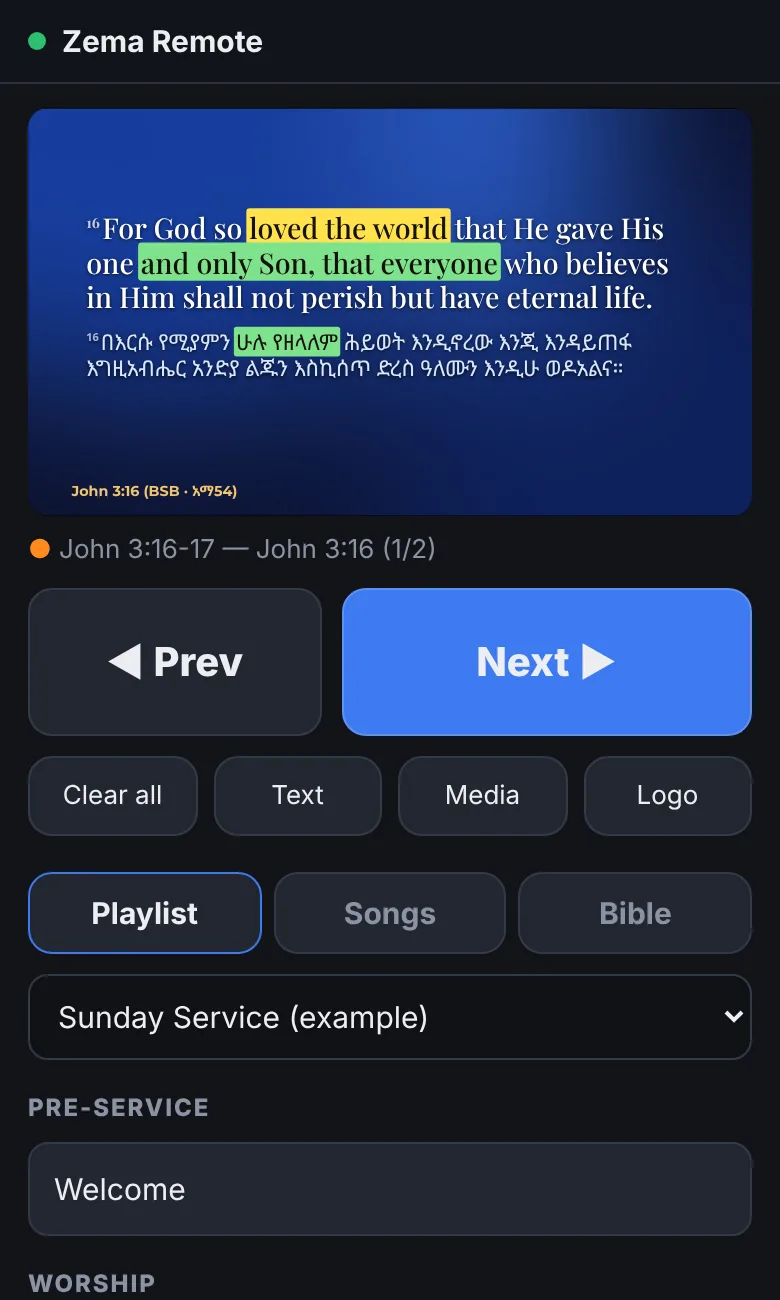
Scan the QR code in Zema and your phone or tablet becomes the remote, protected by a PIN. Go to the next or previous slide, clear the screen, or open any song or passage in the playlist.

Phone remote
The phone remote with the live slide, Previous and Next, and the playlist.
Also in Zema

What else the media team gets

A different picture on every screen

The projector, the stage monitor and a lower third for the livestream in OBS each get their own theme and languages.

Announcement slides

Type straight on the slide in the full-screen editor. Add pictures, GIFs, videos, QR codes and scrolling text, then pick a theme, a motion background and a text animation.

One song library for the whole team

Keep the library in Google Drive. The worship leader prepares the playlist at home and it is on the church computer when you arrive. Every song keeps its earlier versions, and deleted songs can be brought back for 30 days.

Bring your existing slides

Import PowerPoint files, PDFs, Google Slides and Canva designs.

Giving by QR code

Paste your church's Betaalverzoek or Tikkie link. Zema shows it as a QR code for banking apps, full screen or in a corner over the lyrics.

Clickers and Stream Deck

Presentation clickers work without setup. A Stream Deck can run Zema through Bitfocus Companion.

Questions

Before you install

Is Zema really free?

Yes. Zema is free for every church, without an account, and you can install it on as many computers as you like. The pronunciation is always free. Only machine translation can cost money, because it runs on Claude. With your church's own key a song costs about half a cent to a cent, or someone who runs a translation service can give you a church code.

How good are the translations?

Good enough to start from, and someone who knows both languages should read them before Sunday. Zema translates line by line, so each English line stays next to its Amharic line, and you can change any word in the song editor. A free local model (Ollama) works too, but it is weaker in Amharic and Tigrinya.

We make our slides in PowerPoint now. Can we bring them?

Yes. Import a PowerPoint file as it looks (every slide becomes a picture) or as editable text in a Zema theme. PDFs, Google Slides and Canva designs import too. For songs, pasting the lyrics is often quicker: you get the pronunciation and the translation as well.

Does Zema need the internet during the service?

No. Zema runs on your computer, and the screens, phones and stage display connect over the church Wi-Fi. Translating a song, importing from Canva or Google Slides, and sharing the library through Google Drive use the internet while you prepare.

Which computer do I need?

A Windows 10 or 11 PC, or a Mac with macOS 11 (Big Sur) or newer, Apple Silicon or Intel. Connect the projector as an extended display, not mirrored. For a server or Linux there is a Docker version; see the guide.

Can several people prepare the service?

Yes. Keep the library in Google Drive (a Shared drive of your church is best). The worship leader prepares the playlist at home, the media team adds songs, and the church computer has everything. If two people change the same song, the earlier version stays in the history.

Can I use the songs from WikiMezmur?

Copy one song at a time and paste it into Zema. It credits WikiMezmur on the slides, as the site asks. The lyrics belong to the artists: a church licence such as CCLI, or the artist's permission, covers showing them in services.

Where are my songs kept?

On your computer, as plain files in Documents/Zema, or in the Google Drive folder you choose. Zema makes a backup every day and keeps deleted songs for 30 days.

Windows or my Mac warns about the download. Is that right?

Yes. Zema isn't signed with a paid certificate yet, so Windows and macOS ask once whether you trust it. The download wizard shows exactly what to click; after that Zema opens like any other app.

Put Zema on the church computer before Sunday

Free for every church, on Windows and Mac. The download wizard picks the right file and shows each step of the installation.

Download Zema free

Your songs stay on your computer or in your own Google Drive.